Quick Answer
Most turnstile gate problems are caused by power supply issues, blocked or misaligned infrared sensors, access control communication failures, motor or mechanical problems, or incorrect controller settings.
If a turnstile suddenly stops working, first check the power supply, infrared sensors, access control device, controller status, and whether any foreign objects are blocking the gate movement.
For safety-related problems such as unexpected closing or repeated alarms, stop using the gate until the sensor and motor system have been inspected.
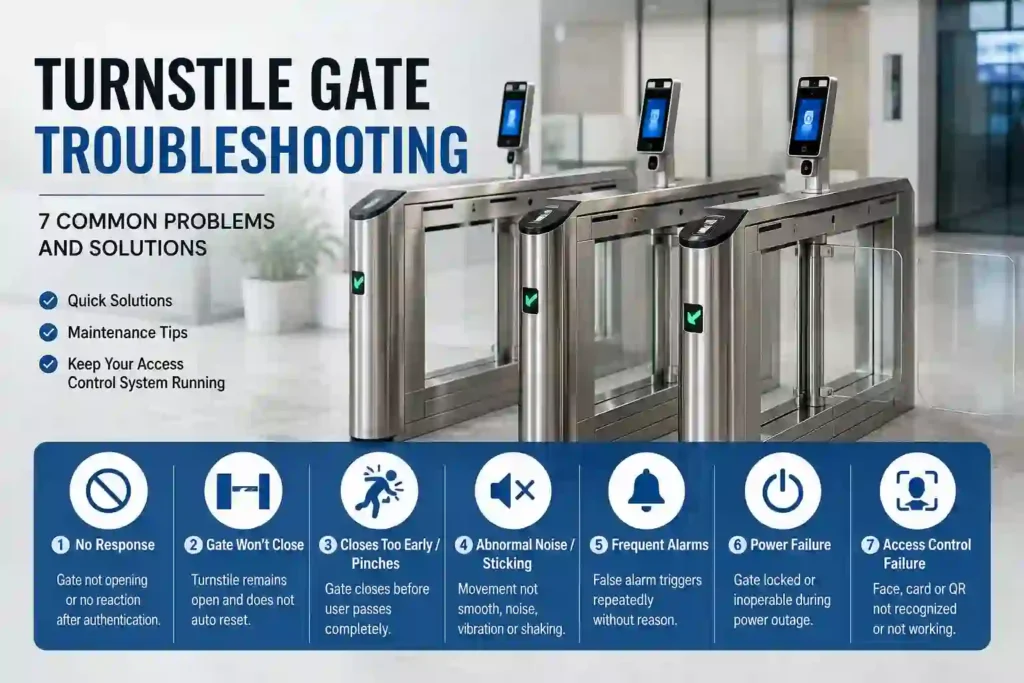
7 Common Turnstile Gate Problems and How to Fix Them
Turnstile gates are widely used in office buildings, factories, residential communities, metro stations, commercial buildings, schools, and other controlled pedestrian entrances.
Although modern pedestrian turnstiles are designed for frequent operation, problems may still occur after long-term use, incorrect installation, power fluctuations, dirty sensors, or communication failures.
Below are seven common turnstile gate problems and practical troubleshooting methods.
1. Turnstile Gate Does Not Open
Problem
After a user scans a card, face, QR code, or other access credential, the turnstile does not open and the indicator light may remain unchanged.
This is one of the most common turnstile gate problems.
Possible Causes
The problem may be related to:
- Power supply failure
- Turnstile controller malfunction
- Loose communication cables
- Access control reader failure
- Incorrect access permissions
- Motor or control board problems
- Network communication failure
Quick Solutions
Start with the following checks:
- Check whether the turnstile has normal power.
- Restart the turnstile controller.
- Check the card reader, facial recognition terminal, or QR code scanner.
- Inspect communication and signal cables.
- Confirm that the user’s access permission is valid.
- Check whether the controller receives the gate-opening signal.
If the access control system receives the authentication correctly but the gate still does not move, further inspection of the motor, control board, or drive mechanism may be required.
2. Turnstile Gate Does Not Close
Problem
The turnstile opens normally, but after a person passes through, the gate remains open instead of automatically returning to the closed position.
Possible Causes
A turnstile that stays open is often related to the infrared detection system.
Possible causes include:
- An infrared sensor is blocked
- Dust or dirt covers the sensor
- Sensor alignment is incorrect
- An object remains inside the detection zone
- Closing delay settings are incorrect
- The controller has not reset correctly
Quick Solutions
First:
- Remove any objects from the infrared detection area.
- Clean the infrared sensor.
- Check whether the transmitter and receiver are correctly aligned.
- Restart the turnstile.
- Check the automatic closing delay setting.
If the problem continues, inspect the sensor wiring and controller input signals.
3. Pedestrian Access Control Gate Closes Too Early or Pinches People
Problem
The gate starts closing before the pedestrian has completely passed through.
This can cause the barrier arm or wing to contact people, luggage, carts, or other objects.
This type of problem should be treated seriously because it directly affects pedestrian safety.
Possible Causes
Common reasons include:
- Incorrect infrared sensor sensitivity
- Insufficient anti-pinch detection zones
- Misaligned infrared sensors
- Incorrect closing timing
- Motor braking or control problems
- Damaged sensors
Quick Solutions
Check:
- Infrared sensor alignment
- Anti-pinch detection zones
- Sensor sensitivity
- Gate closing delay
- Motor braking function
- Controller safety settings
For locations used by children, elderly people, passengers with luggage, or people with limited mobility, sufficient infrared detection zones are especially important.
A turnstile with frequent anti-pinch problems should not remain in normal operation until the safety system has been inspected.
4. Swing Barrier Gate Moves Slowly, Shakes, or Makes Abnormal Noise
Problem
The gate does not move smoothly and may produce clicking, grinding, vibration, or other unusual sounds during opening and closing.
Possible Causes
Possible reasons include:
- Dust or foreign objects inside the mechanism
- Insufficient lubrication
- Loose mechanical components
- Worn transmission parts
- Motor problems
- Incorrect gate alignment
- Excessive resistance in the movement mechanism
Quick Solutions
Start by:
- Turning off the power before inspecting internal mechanical parts.
- Removing dust and foreign objects.
- Checking the rotating shaft and transmission mechanism.
- Applying suitable lubrication where required.
- Checking whether screws or mechanical connections are loose.
- Inspecting the motor and transmission components.
Do not apply excessive lubricant to electrical or sensor components.
If abnormal noise continues after cleaning and lubrication, the internal mechanism or motor may require professional inspection.
5. Turnstile Keeps Alarming
Problem
The turnstile continuously sounds an alarm even when nobody is passing through.
False alarms are commonly related to the infrared sensor system.
Possible Causes
Typical causes include:
- Dirty infrared sensors
- Sensor misalignment
- Objects blocking the detection area
- Strong sunlight or environmental interference
- Loose sensor wiring
- Controller input errors
Quick Solutions
Try the following:
- Clean the infrared sensor surface.
- Remove objects around the detection zone.
- Check the sensor alignment.
- Check whether the sensor wiring is loose.
- Power off and restart the system.
If the turnstile is installed outdoors or near strong sunlight, environmental interference should also be considered when positioning and adjusting infrared sensors.
6. Turnstile Cannot Open During a Power Failure
Problem
When the building loses power, the pedestrian gate remains locked and people cannot pass through.
Emergency access is an important consideration when choosing and configuring a turnstile system.
Possible Solutions
Depending on the turnstile design, several solutions may be available.
Manual Emergency Release
Some pedestrian gates include a manual emergency release mechanism that allows the barrier to be unlocked manually.
Automatic Fail-Safe Opening
Certain turnstile configurations can automatically unlock or open when power is lost.
This allows pedestrians to evacuate more easily during an emergency.
UPS Backup Power
A UPS backup power supply can temporarily maintain operation of the turnstile and access control system during a power outage.
When designing an entrance control system, the emergency behavior of the turnstile should be determined according to the site’s safety and evacuation requirements.
7. Face Recognition, Card Reader, or QR Scanner Does Not Work
Problem
The mechanical turnstile operates normally, but users cannot open it through facial recognition, access cards, QR codes, or other identification devices.
In this situation, the problem may be in the access control system rather than the turnstile mechanism itself.
Possible Causes
Possible reasons include:
- Dirty facial recognition camera
- Faulty card reader
- QR scanner failure
- Network disconnection
- Communication cable problem
- Incorrect software configuration
- Invalid user permissions
- Access control device offline
Quick Solutions
Check:
- Clean the camera, card reader, or scanner.
- Confirm network connectivity.
- Restart the identification device.
- Check communication cables.
- Confirm user access permissions.
- Check whether the access control device is communicating with the turnstile controller.
A useful troubleshooting method is to determine whether the turnstile controller receives the opening signal.
If the controller receives the signal but the gate does not open, the problem is likely related to the turnstile.
If no opening signal reaches the controller, the access control device or communication system should be inspected first.
Turnstile Gate Troubleshooting Table
| Problem | Common Cause | First Action |
|---|---|---|
| Gate does not open | Power or access control failure | Check power and restart controller |
| Gate does not close | Infrared sensor blocked | Clean and inspect sensors |
| Gate closes too early | Sensor or anti-pinch setting | Check safety detection zones |
| Gate shakes or makes noise | Mechanical resistance or wear | Clean and inspect mechanism |
| Continuous alarm | Infrared sensor problem | Clean and realign sensors |
| Locked during power outage | No emergency release | Use emergency release or backup power |
| Face/card/QR does not work | Access control failure | Check device, network, and wiring |
A Simple Turnstile Troubleshooting Sequence
When a pedestrian turnstile suddenly stops working, technicians can usually troubleshoot it in the following order.
Step 1: Check the Power Supply
Confirm that the turnstile, controller, and access control devices are receiving stable power.
Step 2: Check the Indicator and Controller Status
Look for abnormal indicator lights, alarm codes, or error messages.
Step 3: Check the Infrared Sensors
Make sure all infrared detection areas are clean and unobstructed.
Step 4: Check the Access Control Device
Test the card reader, face recognition terminal, QR scanner, or push button separately.
Step 5: Check Communication Wiring
Inspect control signal cables, network cables, and connectors.
Step 6: Restart the System
A controller reset can sometimes clear temporary communication or sensor errors.
Step 7: Inspect Mechanical Components
If electrical and control systems are normal, inspect the motor, drive system, bearings, shafts, and moving components.
How to Reduce Turnstile Gate Failures
Preventive maintenance can reduce many common pedestrian gate problems.
Keep Infrared Sensors Clean
Dust, water, fingerprints, or other contamination can affect sensor performance.
Regularly clean the sensor surface and check alignment.
Inspect Moving Parts
Check the motor, shaft, bearings, fasteners, and transmission components regularly.
Unusual vibration or noise should be investigated early.
Check Access Control Connections
Inspect card readers, face recognition devices, QR scanners, network cables, and signal wiring.
Test Emergency Functions
Emergency opening and power-failure behavior should be tested periodically.
Keep the Gate Area Clear
Avoid placing boxes, decorations, signs, or other objects inside the infrared detection zone.
Perform Regular Maintenance
For turnstiles operating continuously in factories, stations, office buildings, or commercial entrances, scheduled inspection can help identify small problems before they result in system downtime.
When Should You Contact a Turnstile Technician?
Basic problems such as dirty sensors, temporary controller errors, or blocked detection zones can often be resolved quickly.
Professional inspection is recommended when:
- The motor repeatedly stops working.
- The gate frequently pinches pedestrians.
- The control board shows repeated errors.
- Abnormal noise continues after cleaning.
- Electrical components overheat.
- The turnstile cannot enter emergency mode.
- Sensors repeatedly fail after adjustment.
- Mechanical components are damaged.
Electrical and mechanical repairs should be carried out by qualified personnel.
Frequently Asked Questions
Why is my swing barrier turnstile not opening after scanning a card?
First check whether the access control device successfully recognizes the card and sends an opening signal to the turnstile controller.
If the signal is received but the gate does not move, inspect the controller, motor, power supply, and drive system.
Why does my turnstile stay open?
The most common reason is that an infrared sensor continues detecting an object in the passage.
Clean the sensors, remove obstacles, check sensor alignment, and inspect the automatic closing settings.
Why does my turnstile keep beeping?
Continuous alarms are often caused by blocked, dirty, or misaligned infrared sensors.
Sensor wiring and controller settings should also be checked.
Can a turnstile open automatically during a power failure?
It depends on the configuration.
Some turnstiles support fail-safe unlocking or automatic opening during a power failure, while others use manual emergency release systems or UPS backup power.
How often should turnstile gates be maintained?
The maintenance interval depends on usage frequency and the installation environment.
High-traffic gates should be inspected more frequently, especially the infrared sensors, mechanical drive system, motor, wiring, and emergency functions.
Conclusion
Most turnstile gate failures can be traced to five main areas: power supply, infrared sensors, access control devices, controller communication, and mechanical components.
A systematic troubleshooting process usually starts with the simplest checks—power, sensors, wiring, and controller status—before moving to motor and mechanical inspection.
For high-traffic entrances, regular preventive maintenance is one of the most effective ways to reduce downtime and improve pedestrian safety.
If you are planning a new pedestrian access control project, selecting the right turnstile type, safety sensor configuration, access control method, and emergency opening system is just as important as troubleshooting problems after installation.
Looking for a turnstile gate for your project?
Explore our pedestrian turnstile solutions for factories, office buildings, commercial facilities, residential communities, and controlled access entrances, or contact us for a configuration recommendation based on your entrance width and access control requirements.